
Aviator Game Download for Android — Official APK Installation Guide 2026
The Aviator crash game by Spribe is not available on the Google Play Store — and that is by design, not a red flag. Google's global policy restricts real-money gambling apps from its marketplace, which means every legitimate casino offering Aviator distributes its Android app as a direct APK download from its official website. This guide covers everything Indian players need to know: why APK is the only legitimate route, how to install it safely in under three minutes, which casino apps are worth downloading, and how to troubleshoot the most common installation issues.
Why Aviator APK Is Not on Google Play Store
Google enforces a strict policy that prohibits real-money gambling applications from being listed on the Play Store in most markets, including India. This is not unique to Aviator — every licensed casino app, sports betting platform, and crash game operates outside the Play Store ecosystem for the same reason. The restriction is a platform policy, not a legal judgement on the game itself.
Because of this, licensed casino operators distribute their Android apps directly through their official websites as APK files. An APK (Android Package Kit) is simply the standard file format Android uses to install any application — the same format Google uses internally. Downloading an APK from a licensed casino's official domain is a well-established, safe practice across the global iGaming industry.
The critical distinction is source. An APK downloaded from a casino holding a valid Curaçao eGaming licence is legitimate. An APK sourced from a third-party app store, Telegram channel, or unknown website is not. Fake Aviator apps circulate widely and are designed to steal credentials or redirect deposits to fraudulent accounts.
- No Spribe branding visible inside the game interface — the authentic Aviator always displays the Spribe logo
- Requests unusual permissions such as access to contacts, SMS, or call logs
- No licence information in the app footer or linked casino website
- Promises guaranteed wins or includes a built-in "predictor" feature
- Hosted on a third-party APK aggregator rather than a named casino's official domain
Experts recommend verifying the casino's licence badge in the website footer before downloading any APK. Licensed platforms are legally required to display their regulatory credentials. If no licence is visible, the download should be avoided entirely.
System Requirements for Aviator Android App
Aviator is a lightweight application by modern standards — its real-time multiplier animation and live statistics panel are optimised for mid-range Android devices common across India. The following specifications represent what is needed to run the app without lag, dropped connections, or display issues.
| Parameter | Minimum | Recommended | Notes |
|---|---|---|---|
| Android Version | Android 5.0 (Lollipop) | Android 12 or higher | Older versions may experience UI rendering issues |
| RAM | 1 GB | 2 GB or more | 2 GB ensures smooth multitasking during live rounds |
| Free Storage | 80 MB | 150 MB | Additional space needed for cache and updates |
| Internet Connection | Stable 3G | 4G / Wi-Fi | Unstable connections can cause missed cashout windows |
| Processor | Quad-core 1.2 GHz | Octa-core 1.8 GHz+ | Affects animation smoothness and load time |
Most Android smartphones released after 2018 meet the recommended specifications. Devices running Android 12 or later benefit from improved background process management, which reduces the risk of the app being terminated mid-round. A stable 4G connection is strongly advised — a dropped connection during the cashout window means the bet resolves without player input, which can result in a loss.
How to Download Aviator Game APK on Android — Step by Step
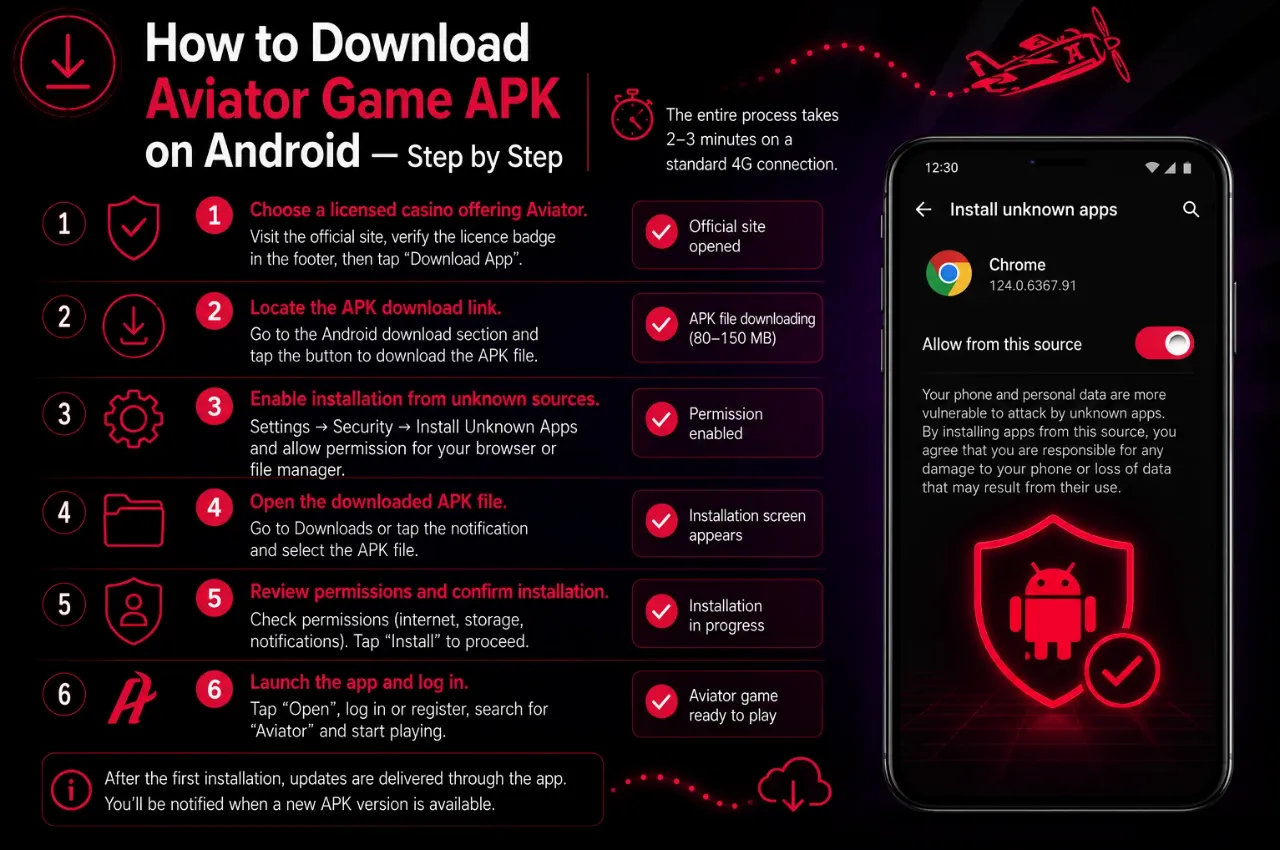
The entire process takes approximately two to three minutes on a standard 4G connection. Each step below includes the expected result so players know the installation is proceeding correctly.
- Choose a licensed casino offering Aviator. Navigate to the official website of a licensed casino that hosts the Aviator game by Spribe. Verify the licence badge in the footer before proceeding. The casino's mobile page typically displays a prominent "Download App" or "Get Android App" button.
- Locate the APK download link. Find the Android download section — usually accessible from the main navigation or a dedicated "Mobile App" page. Tap the download button. The browser will begin downloading the APK file to the device's default Downloads folder. File size is typically between 80 MB and 150 MB.
- Enable installation from unknown sources. Android blocks APK installations from outside the Play Store by default. When prompted, go to Settings → Security → Install Unknown Apps (exact path varies by Android version) and toggle permission for the browser or file manager being used. This setting can be disabled again after installation.
- Open the downloaded APK file. Navigate to the Downloads folder using the device's file manager, or tap the completed download notification. Select the APK file. Android will display an installation confirmation screen listing the permissions the app requests.
- Review permissions and confirm installation. Legitimate casino apps request only standard permissions: internet access, storage (for cache), and notifications. If the app requests access to contacts, SMS, or call logs, cancel the installation immediately — this is a red flag. Tap "Install" to proceed.
- Launch the app and log in. Once installation completes, tap "Open" or find the casino icon on the home screen. Log in with existing credentials or complete a quick registration. Navigate to the game lobby, search for "Aviator," and the game will load within seconds. The Spribe logo should be visible in the game interface, confirming authenticity.
After the first successful installation, future updates are typically delivered through the app itself — a notification will prompt the download of a new APK when a version update is available. The process for updates mirrors the initial installation.
Best Casino Apps to Download Aviator in India
Not all casino apps are equal in terms of performance, payment support, and bonus availability for Indian players. The following comparison covers platforms that offer the authentic Aviator game by Spribe, support UPI deposits, and hold valid operating licences. All monetary values are in INR.
| Casino | APK Size | Welcome Bonus | Min Deposit ₹ | UPI Support | Rating |
|---|---|---|---|---|---|
| 1win | ~120 MB | Available on first deposit | ₹100 | Yes | 4.7 / 5 |
| Parimatch India | ~95 MB | Available on first deposit | ₹100 | Yes | 4.6 / 5 |
| Pin-Up Casino | ~110 MB | Available on first deposit | ₹100 | Yes | 4.5 / 5 |
| Mostbet India | ~130 MB | Available on first deposit | ₹200 | Yes | 4.4 / 5 |
| Melbet India | ~100 MB | Available on first deposit | ₹100 | Yes | 4.3 / 5 |
All five platforms listed above accept UPI payments via Google Pay, PhonePe, and Paytm. Minimum deposits start from ₹100 on most platforms, making them accessible for players testing the game with a small initial budget. Welcome bonuses are available on first deposits — exact terms and amounts vary by platform and are subject to wagering requirements, so reviewing the bonus T&C before claiming is recommended.
The ratings above reflect a combination of app performance on mid-range Android devices, payment processing speed, customer support responsiveness, and licence validity. Experts recommend verifying the licence status of any platform independently before making a deposit by checking the regulator's official verification portal.
Aviator App vs Mobile Browser — Which Is Better?
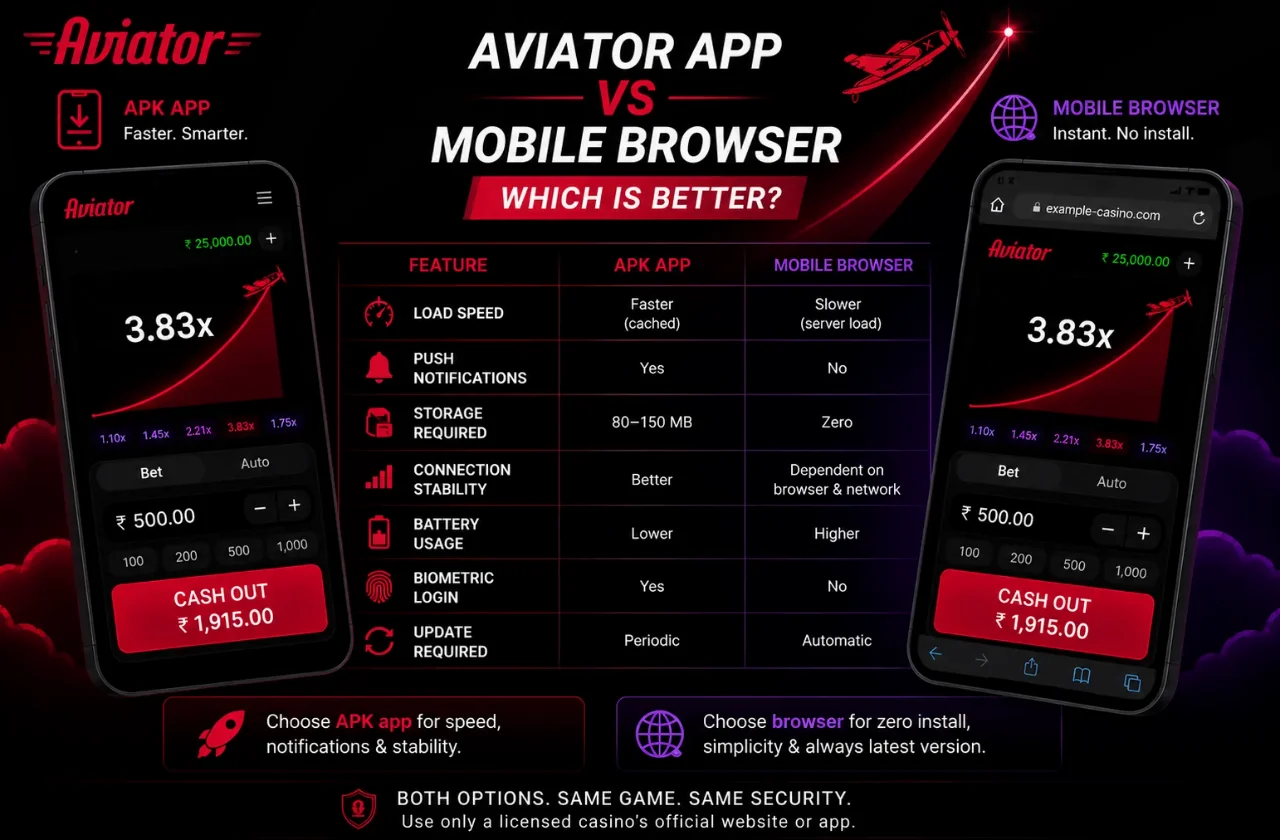
Players who prefer not to install an APK can access Aviator through any modern mobile browser. Both options deliver the full game — the same Provably Fair RNG, the same multiplier mechanics, the same cashout functionality. The differences come down to performance, convenience, and device resource usage.
| Feature | APK App | Mobile Browser |
|---|---|---|
| Load Speed | Faster — assets cached locally | Slower — loads from server each session |
| Push Notifications | Yes — bonus alerts, deposit confirmations | No native push notifications |
| Storage Required | 80–150 MB on device | Zero — no installation needed |
| Connection Stability | Better — optimised for mobile networks | Dependent on browser and network |
| Battery Usage | Slightly lower — native rendering | Higher — browser overhead |
| Biometric Login | Available on most apps | Not available |
| Update Required | Periodic APK updates needed | Always latest version automatically |
For players on mid-range devices with limited storage, the browser version is a practical alternative that requires no installation and always runs the latest version automatically. For players who value faster load times, push notifications for promotions, and a more stable connection during live rounds, the dedicated APK app is the stronger choice. Both options are equally secure when accessed through a licensed casino's official domain.

Arjun Mehta
iGaming analyst with 7+ years covering crash games and online casinos in the Indian market. Specialises in RNG verification and responsible gambling.